Want to learn how to 3D print?
For Makers, Beginners & Everyone In Between
LAPTOP REQUIRED EACH CLASS
Our class curriculum starts with the fundamentals, including printer setup, basic maintenance, filament loading and unloading, and getting your first prints started.
From there, classes build into slicer basics, print settings, model preparation, and more advanced techniques such as infill, layer height, supports, orientation, cutting, smoothing, and other tools that can improve print quality and efficiency.
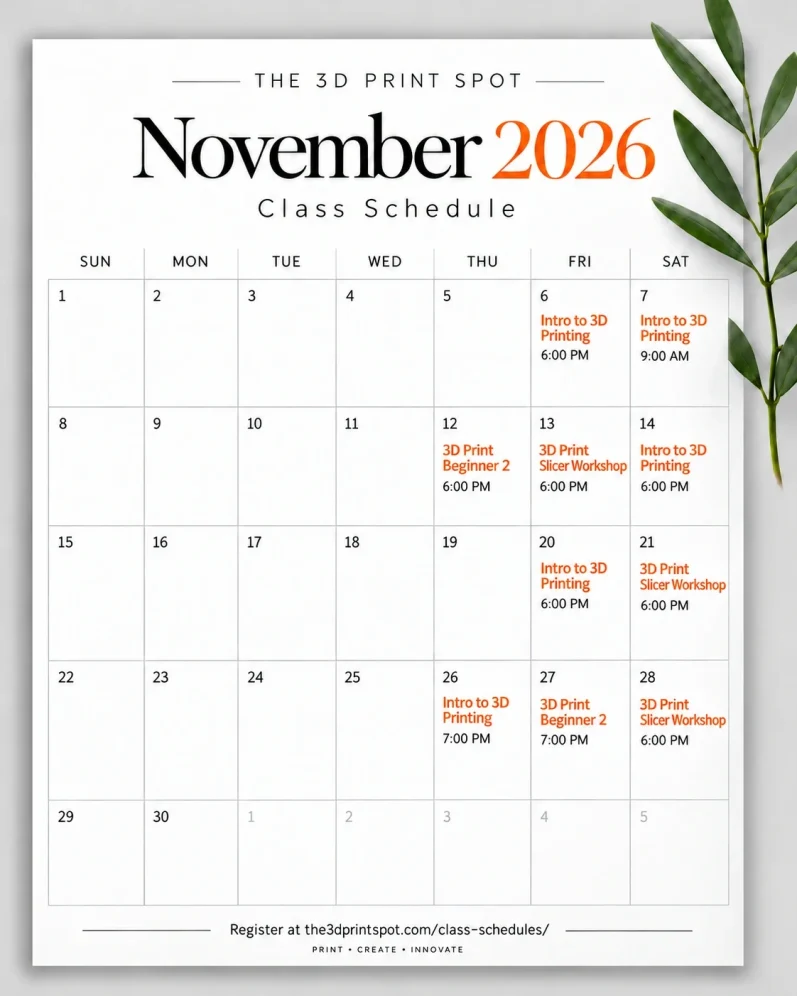
3D Printing Workshops, Tips & Private Classes $40.00 Each
Intro: Getting Started with 3D Printing: Just bought a 3D printer and not sure where to start? This class covers the basics you need to get up and printing with confidence. We’ll cover basic printer maintenance, how to properly load and unload filament, essential printer setup, and how to get started with your first prints. Perfect for brand-new printer owners or anyone who wants a better understanding of the fundamentals before diving deeper into 3D printing.
Beginner 2 | Build on the Basics
Step 2 Building on the Basics:
Building on the fundamentals from Intro to 3D printing. We’ll cover how to get your model ready in a slicer, basic slicer functions, common print settings, and the key adjustments that can affect how your print turns out.Perfect for anyone who understands the basics of their printer and is ready to start making more informed decisions about their prints.
Laptop Required
*Most classes require participants to bring a personal laptop with their slicer software installed. Laptop requirements will be listed with each class description.
Slicer Workshop | Tips, Tricks & Techniques
Dive deeper into slicer settings including infill, layer height, smoothing, adaptive features, cutting, orientation, and more. Laptop required.
3D Print Private Lesson | One-on-One $150 Each with Paul
Get personalized, hands-on help in a one-hour private lesson for 1–3 people. Whether you’re brand new or want help troubleshooting, dialing in settings, improving print quality, or learning more advanced techniques, the session is built around what you want to accomplish.
For larger groups looking to take a private class, call the store or come in to see how we can accomodate you.
Explore upcoming 3D printing classes and workshops designed to help you build your skills, better understand your printer, and get better results.